Resolving Git Conflicts
Learn how to identify, understand, and resolve merge conflicts that occur when Git cannot automatically combine changes from different branches or contributors.
This tutorial modifies content from Jenna Jordan’s Intro to Git & GitHub (Speedrun edition), which draws from the Software Carpentry Version Control with Git lesson, the Carpentries Incubator Version Control with Git lesson, and the Library Carpentry Introduction to Git lesson. Copyright (c) The Carpentries. The original material is licensed under the Creative Commons Attribution 4.0 International License (CC BY 4.0).
Changes made: Content has been modified and expanded by Innovations for Poverty Action (IPA) to include IPA-specific examples.
- Explain what conflicts are and when they can occur
- Understand how to resolve conflicts resulting from a merge
As soon as people can work in parallel, they’ll likely step on each other’s toes. This will even happen with a single person: if we are working on a piece of software on two different computers, we could make different changes to each copy. Version control helps us manage these conflicts by giving us tools to resolve overlapping changes.
To see how we can resolve conflicts, we must first create one. The file campaigns.txt currently looks like this in our multiverse repository:
Bolivar leads forces to liberate Caracas from Spanish control.
Bolivar and Sucre coordinate the liberation of Quito.
Bolivar establishes Gran Colombia after successful campaign.
Let’s create a new branch to describe 1 possible interpretation of what happens next.
git branch bolivarian-federationBut before we checkout the bolivarian-federation branch and add an alternate interpretation, let’s add a line to campaigns.txt here in the main branch.
Bolivar leads forces to liberate Caracas from Spanish control.
Bolivar and Sucre coordinate the liberation of Quito.
Bolivar establishes Gran Colombia after successful campaign.
The liberation forces retreat as reinforcements arrive.
and commit that change to the main branch
git add campaigns.txt
git commit -m "Add account of tactical retreat"
[main a521b20] Add account of tactical retreat
1 file changed, 1 insertion(+)We can then examine the commit history of the main branch.
git log --onelinea521b20 (HEAD -> main) Add account of tactical retreat
976b48e (origin/main, origin/HEAD) Merge pull request #1 from simon-bolivar-historian/gran-colombia-formation
daf95c3 (origin/gran-colombia-formation) Create asgard.txt detailing Heimdall's awareness of invasion
2f2d364 Complete story with Thor-Jane reunion
ee67c8b Implement counterattack strategy
9b26458 Start story for New Asgard in campaigns.txt
f537d84 Initial commitNow that we’ve made our changes in the main branch, let’s add an event to the bolivarian-federation branch.
git checkout bolivarian-federation
git branch
* bolivarian-federation
mainLet’s add a line in campaigns.txt with Loki’s reveal. Note that when we open this file the line we added about the invaders retreating will not be present as that change is not part of this branch.
Bolivar leads forces to liberate Caracas from Spanish control.
Bolivar and Sucre coordinate the liberation of Quito.
Bolivar establishes Gran Colombia after successful campaign.
Bolivar proposes the Bolivarian federation after the victory.
Now let’s commit this change to the bolivarian-federation branch
git add campaigns.txt
git commit -m "Add proposal for Bolivarian federation"
[bolivarian-federation 7b972b4] Add proposal for Bolivarian federation
1 file changed, 1 insertion(+)Again, we can look at the history of this branch.
git log --oneline7b972b4 (HEAD -> bolivarian-federation) Add proposal for Bolivarian federation
976b48e (origin/main, origin/HEAD) Merge pull request #1 from simon-bolivar-historian/gran-colombia-formation
daf95c3 (origin/gran-colombia-formation) Create asgard.txt detailing Heimdall's awareness of invasion
2f2d364 Complete story with Thor-Jane reunion
ee67c8b Implement counterattack strategy
9b26458 Start story for New Asgard in campaigns.txt
f537d84 Initial commitNotice that the commit related to the invaders retreating is not present as it is part of the main branch, not the bolivarian-federation branch.
Now that we’ve added Loki’s big reveal, we can merge this branch into the main branch. We’re going to do this merge in VS Code rather than through a Pull Request in GitHub this time.
First, let’s checkout the main branch.
git checkout main
git branch
bolivarian-federation
* mainAnd then merge the changes from bolivarian-federation into our current branch, main.
git merge bolivarian-federationAuto-merging campaigns.txt
CONFLICT (content): Merge conflict in campaigns.txt
Automatic merge failed; fix conflicts and then commit the result.Review the status of the repository now that we’ve been told merging has resulted in a conflict.
git statusOn branch main
Your branch is ahead of 'origin/main' by 1 commit.
(use "git push" to publish your local commits)
You have unmerged paths.
(fix conflicts and run "git commit")
(use "git merge --abort" to abort the merge)
Unmerged paths:
(use "git add <file>..." to mark resolution)
both modified: campaigns.txt
no changes added to commit (use "git add" and/or "git commit -a")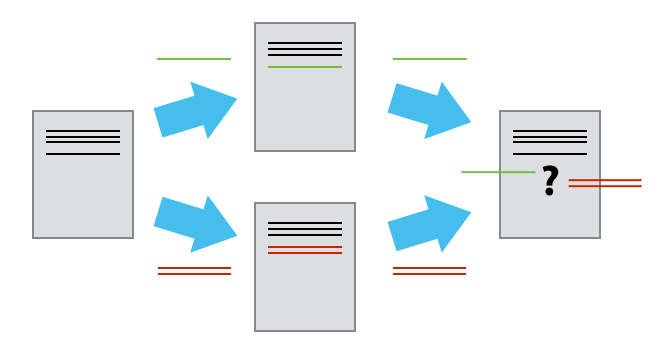
Git detects that the changes made in one copy overlap with those made in the other and stops us from trampling on our previous work. It also marks that conflict in the affected file, campaigns.txt.
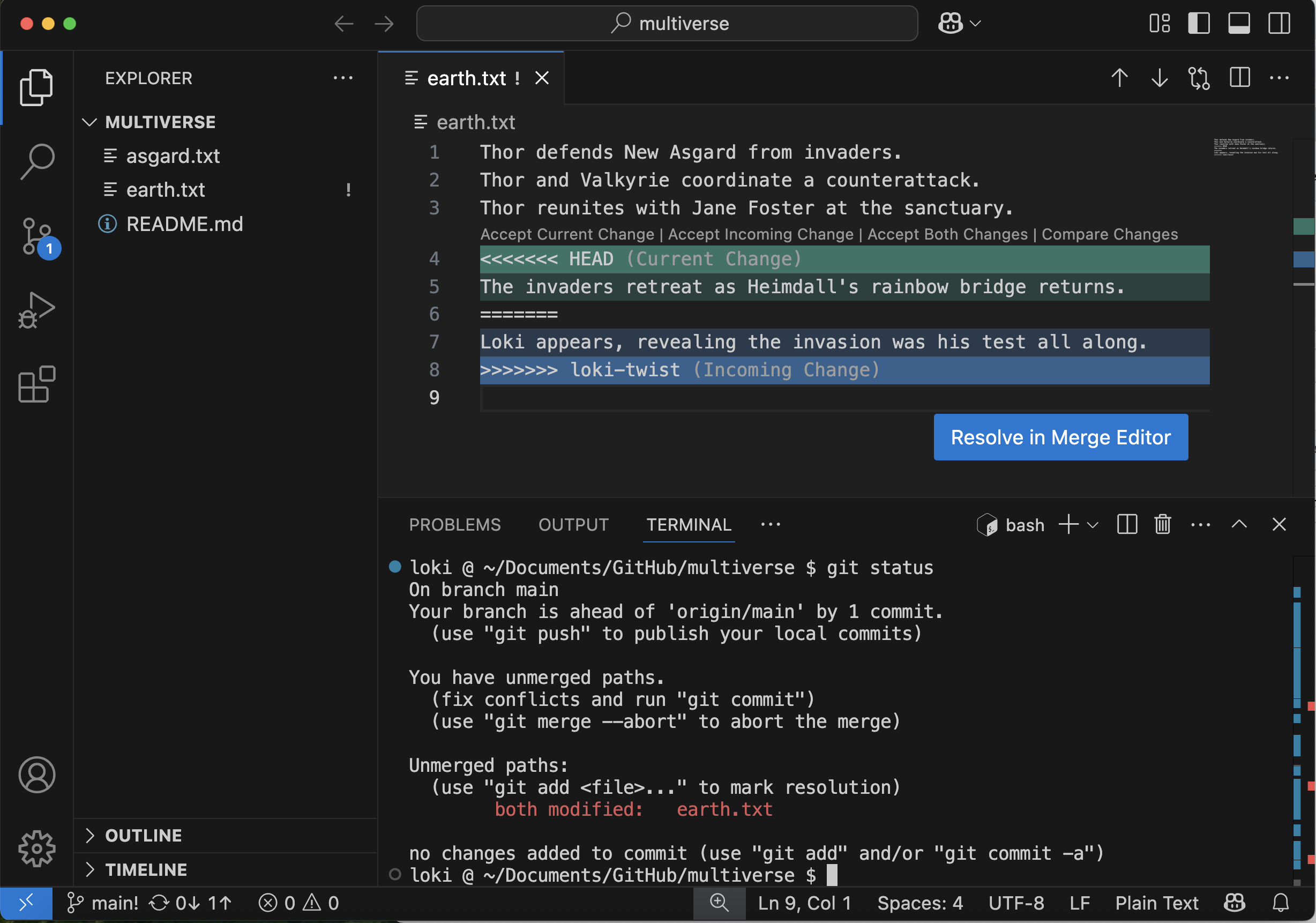
Our change, the one at the HEAD of the main branch, is preceded by <<<<<<<. Git has then inserted ======= as a separator between the conflicting changes and marked the end of our commit from the bolivarian-federation branch with >>>>>>>. (The string of letters and digits after that marker identifies the commit we made in the bolivarian-federation branch.)
It is now up to us to edit this file and reconcile the changes. We can do anything we want: keep the change made in the main branch, keep the change made in the bolivarian-federation branch, write something new to replace both, or get rid of the change entirely.
Let’s keep both of these events, but save Loki’s reveal for after the invaders reatreat.
VS Code will prompt you to “Resolve in Merge Editor”. Click this button.

In the Merge Editor, you will see the two versions side by side, and the final version of the file below. We want the final version to look like:
Bolivar leads forces to liberate Caracas from Spanish control.
Bolivar and Sucre coordinate the liberation of Quito.
Bolivar establishes Gran Colombia after successful campaign.
The liberation forces retreat as reinforcements arrive.
Bolivar proposes the Bolivarian federation after the victory.
We want to click “Accept Combination (Current First)”. You should now see the resolved version with both lines, the line from the main branch first. Click “Complete Merge”.
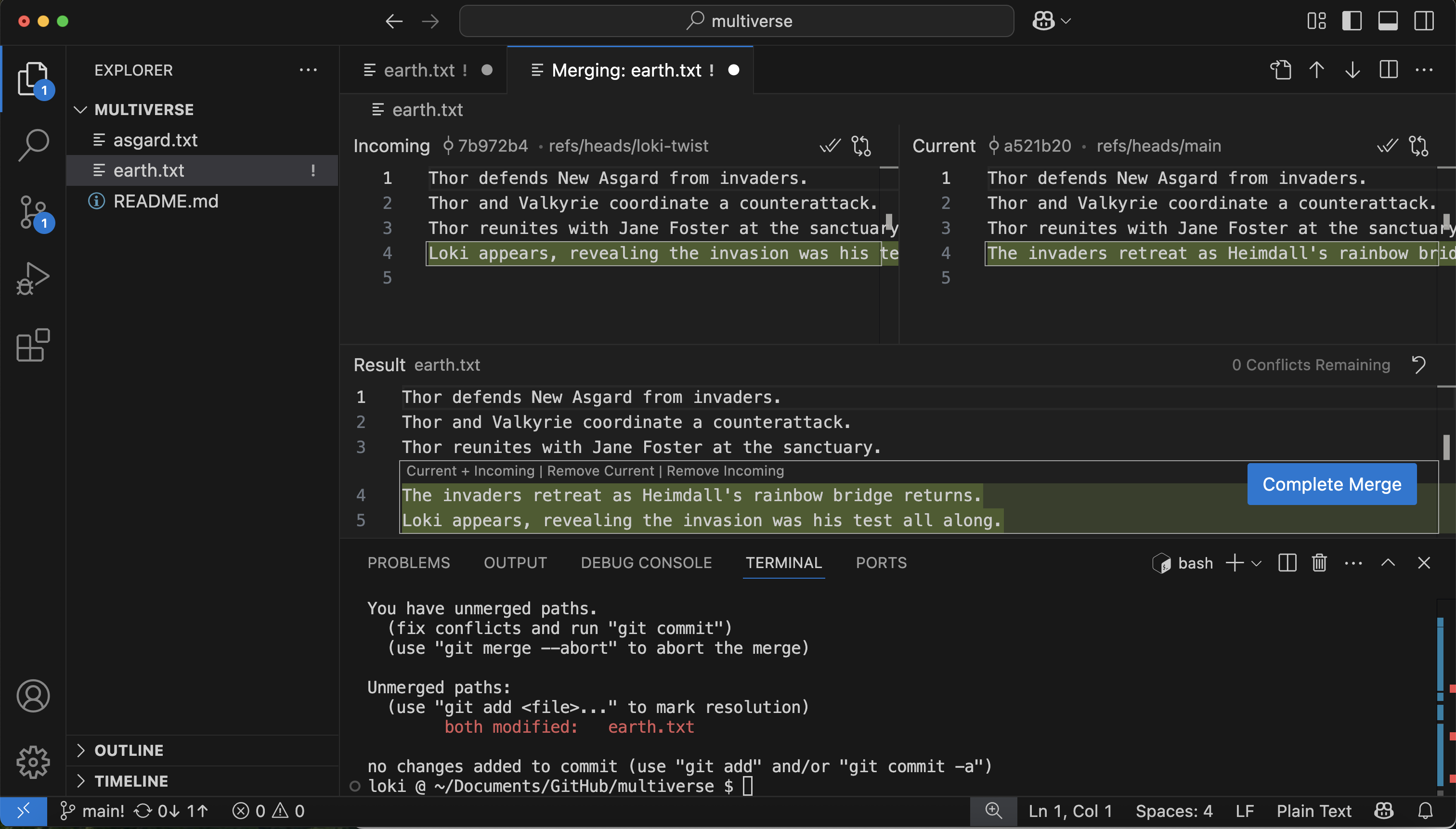
By clicking “Complete Merge”, you are doing the same thing as running the command git add campaigns.txt. If you open the Source Control pane, you should see campaigns.txt under “Staged Changes”. You can then complete the commit using the VS Code UI or on the command line
git commit -m "Merge changes from bolivarian-federation"[main c5c81b3] Merge changes from bolivarian-federationTake a look at the Source Control Graph window (in the lower portion of the Source Control pane) for a visual representation of the git log.
git logcommit c5c81b35d7631b4aa9c7d71d06253c593cbaf644 (HEAD -> main)
Merge: a521b20 7b972b4
Author: Simon Bolivar <simon.bolivar@liberation.org>
Date: Sat May 17 21:36:55 2025 -0400
Merge branch 'bolivarian-federation'
commit 7b972b4d86972ddfbacac225c5c84c8b4a5609ff (bolivarian-federation)
Author: Simon Bolivar <simon.bolivar@liberation.org>
Date: Sat May 17 21:27:20 2025 -0400
Add proposal for Bolivarian federation
commit a521b20ef97343b49b3b25717e485b360fcb8d64
Author: Simon Bolivar <simon.bolivar@liberation.org>
Date: Sat May 17 21:25:13 2025 -0400
Add account of tactical retreatWhen conflicts resolve themselves
Let’s make another change to the bolivarian-federation branch:
git checkout bolivarian-federationAdd another line to campaigns.txt:
Bolivar leads forces to liberate Caracas from Spanish control.
Bolivar and Sucre coordinate the liberation of Quito.
Bolivar establishes Gran Colombia after successful campaign.
Bolivar proposes the Bolivarian federation after the victory.
The campaign concludes with unified territories under the new federation.
git add campaigns.txt
git commit -m "Document federation unification of territories"
[bolivarian-federation 959f09c] Document federation unification of territories
1 file changed, 1 insertion(+)And merge that change into main branch
git checkout main
git merge bolivarian-federation
Updating c5c81b3..959f09c
Fast-forward
campaigns.txt | 1 +
1 file changed, 1 insertions(+), 0 deletions(-)Git keeps track of what we’ve merged with what, so we don’t have to fix things by hand again. There is no conflict and our changes are added automatically.
Finally, let’s update our remote repository:
git pushThis exercise is dependent on how the merge conflict was resolved in our first merge of the bolivarian-federation branch and may still result in a conflict when merging additional commits from the bolivarian-federation branch.
Bolivar leads forces to liberate Caracas from Spanish control.
Bolivar and Sucre coordinate the liberation of Quito.
Bolivar establishes Gran Colombia after successful campaign.
The liberation forces retreat as reinforcements arrive.
Bolivar proposes the Bolivarian federation after the victory.
The campaign concludes with unified territories under the new federation.
We don’t need to merge again because Git knows someone has already done that.
Git’s ability to resolve conflicts is very useful, but conflict resolution costs time and effort, and can introduce errors if conflicts are not resolved correctly. If you find yourself resolving a lot of conflicts in a project, consider these technical approaches to reducing them:
- Pull from upstream more frequently, especially before starting new work
- Use topic branches to separate work, merging to main when complete
- Make smaller more atomic commits
- Where logically appropriate, break large files into smaller ones so that it is less likely that two authors will alter the same file simultaneously
Conflicts can also be minimized with project management strategies:
- Try breaking large files apart into smaller files so that it is less likely that you will be working in the same file at the same time in different branches
- Create branches focused on separable tasks so that your work won’t overlap in files
- Clarify who is responsible for what areas with your collaborators
- Discuss what order tasks should be carried out in with your collaborators so that tasks that will change the same file won’t be worked on at the same time
You can repeat this exercise twice, once in your multiverse repo, and once in your partner’s.
You will first need to clone your partner’s multiverse repo in order to make edits in it.
You will each create a new branch in the same multiverse repo, and make a small conflicting change (e.g. adding two different lines to the end of campaigns.txt).
The repo owner should then create a Pull Request and merge their branch first.
The other person should then create a Pull Request to merge their branch. They will get a merge conflict.
In VS Code, they can merge main into their branch and resolve the conflict, then push the commit with the resolved merge to GitHub. They should now be able to merge their branch into main as well.
Key Points
- Conflicts occur when files are changed in the same place in two commits that are being merged
- The version control system does not allow one to overwrite changes blindly during a merge, but highlights conflicts so that they can be resolved