Branches
Learn how to use Git branches to work on separate tasks in parallel, experiment with different solutions, and safely develop features without affecting the main codebase.
This tutorial modifies content from Jenna Jordan’s Intro to Git & GitHub (Speedrun edition), which draws from the Software Carpentry Version Control with Git lesson, the Carpentries Incubator Version Control with Git lesson, and the Library Carpentry Introduction to Git lesson. Copyright (c) The Carpentries. The original material is licensed under the Creative Commons Attribution 4.0 International License (CC BY 4.0).
Changes made: Content has been modified and expanded by Innovations for Poverty Action (IPA) to include IPA-specific examples.
- Understand why branches are useful for:
- working on separate tasks in the same repository concurrently
- trying multiple solutions to a problem
- check-pointing versions of code
- Merge branches back into the main branch
Thus far we’ve always been working in a straight timeline. However, there are times when we might want to keep our main work safe from experimental changes we are working on. To do this we can use branches to work on separate tasks in parallel without changing our current branch, main.
We didn’t see it before but the first branch made is called main. This is the default branch created when initializing a repository and is often considered to be the “clean” or “working” version of a repository’s code.
We can see what branches exist in a repository by typing
git branch* mainThe ‘*’ indicates which branch we are currently on.
In this lesson, Loki needs to track two possible branching timelines, with two different versions of events happening on Asgard. Only one of these timeline branches will become part of the “main” timeline. In one timeline, Heimdall, guardian of the bifrost bridge, is aware of the invasion in New Asgard. In another timeline, Heimdall is blinded by powerful magic and is unaware of any trouble in New Asgard.
First let’s make the branch where Heimdall is aware. We use the same git branch command but now add the name we want to give our new branch
git branch heimdall-awareWe can now check our work with the git branch command.
git branch heimdall-aware
* mainWe can see that we created the heimdall-aware branch but we are still in the main branch.
We can also see this in the output of the git status command.
git statusOn branch main
nothing to commit, working directory cleanTo switch to our new branch we can use the checkout command we learned earlier and check our work with git branch.
git checkout heimdall-aware
git branch
* heimdall-aware
mainWe can use the checkout command to checkout a file from a specific commit using commit hashes or HEAD and the filename (git checkout HEAD <file>). The checkout command can also be used to checkout an entire previous version of the repository, updating all files in the repository to match the state of a desired commit.
Branches allow us to do this using a human-readable name rather than memorizing a commit hash. This name also typically gives purpose to the set of changes in that branch. When we use the command git checkout <branch_name>, we are using a nickname to checkout a version of the repository that matches the most recent commit in that branch (a.k.a. the HEAD of that branch).
Here you can use git log and ls to see that the history and files are the same as our main branch. This will be true until some changes are committed to our new branch.
git log --oneline2f2d364 (HEAD -> heimdall-aware, origin/main, origin/HEAD, main) Complete story with Thor-Jane reunion
ee67c8b Implement counterattack strategy
9b26458 Start story for New Asgard in earth.txt
f537d84 Initial commitNow let’s write what happens on Asgard.
Use the “New file” button to create a new file called asgard.txt.
Add one line to this file (and make sure to end with a newline), and then save it:
Heimdall watches from afar, aware of New Asgard's plight.Now we can add and commit the script to our branch.
git add asgard.txt
git commit -m "Create asgard.txt detailing Heimdall's awareness of invasion"
[heimdall-aware daf95c3] Create asgard.txt detailing Heimdall's awareness of invasion
1 file changed, 1 insertion(+)
create mode 100644 asgard.txtLet’s check our work!
git log --onelinedaf95c3 (HEAD -> heimdall-aware) Create asgard.txt detailing Heimdall's awareness of invasion
2f2d364 (origin/main, origin/HEAD, main) Complete story with Thor-Jane reunion
ee67c8b Implement counterattack strategy
9b26458 Start story for New Asgard in earth.txt
f537d84 Initial commitAs expected, we see our commit in the log.
Now let’s switch back to the main branch.
git checkout main
git branch
heimdall-aware
* mainLet’s explore the repository a bit.
Now that we’ve confirmed we are on the main branch again. Let’s confirm that asgard.txt and our last commit aren’t in main.
git log --oneline2f2d364 (HEAD -> main, origin/main, origin/HEAD) Complete story with Thor-Jane reunion
ee67c8b Implement counterattack strategy
9b26458 Start story for New Asgard in earth.txt
f537d84 Initial commitWe no longer see the file asgard.txt and our latest commit doesn’t appear in this branch’s history. But do not fear! All of our hard work remains in the heimdall-aware branch. We can confirm this by moving back to that branch.
git checkout heimdall-aware
git branch
* heimdall-aware
maingit log --onelineAnd we see that our asgard.txt file and respective commit have been preserved in the heimdall-aware branch.
Checkout the main branch again to prepare for creating another new branch based on the version history in main. New branches will include the entire history up to the current commit, and we’d like to keep these two tasks separate.
git checkout main
git branch
heimdall-aware
* mainNow we can keep track of a different timeline branching off from the main timeline.
This time let’s create and switch to the heimdall-blind branch in one command.
We can do so by adding the -b flag to checkout.
git checkout -b heimdall-blind
git branch
heimdall-aware
* heimdall-blind
mainWe can use git log to see that this branch is the same as our current main branch.
git log --oneline2f2d364 (HEAD -> heimdall-blind, origin/main, origin/HEAD, main) Complete story with Thor-Jane reunion
ee67c8b Implement counterattack strategy
9b26458 Start story for New Asgard in earth.txt
f537d84 Initial commitNow we can a file for Asgard again and write the different version of events. This time, let’s make a markdown file instead of a text file.
Use the “New File” button to create a new file called asgard.md and add this line:
Heimdall's vision is blocked by *ancient magic*, unaware of New Asgard's danger.git add asgard.md
git commit -m "Create asgard.md describing Heimdall's blocked vision"[heimdall-blind 59b9bab] Create asgard.md describing Heimdall's blocked vision
1 file changed, 1 insertion(+)
create mode 100644 asgard.mdLet’s check our work again before we switch back to the main branch.
git log --oneline59b9bab (HEAD -> heimdall-blind) Create asgard.md describing Heimdall's blocked vision
2f2d364 (origin/main, origin/HEAD, main) Complete story with Thor-Jane reunion
ee67c8b Implement counterattack strategy
9b26458 Start story for New Asgard in earth.txt
f537d84 Initial commitLoki decides the version of events where Heimdall is aware should be part of the main timeline.
We will merge the heimdall-aware branch into our main branch via a Pull Request so we can use it for our work going forward.
Before we can create a Pull Request on GitHub, we need to push this branch to the remote repo
Let’s checkout & push the heimdall-aware branch:
git checkout heimdall-aware
git push
Whoops, we got an error:
fatal: The current branch heimdall-aware has no upstream branch.
To push the current branch and set the remote as upstream, use

    git push --set-upstream origin heimdall-aware

To have this happen automatically for branches without a tracking
upstream, see 'push.autoSetupRemote' in 'git help config'.
While our main branch was already on both our local and remote repositories, our heimdall-aware branch is only on our local computer. You can check this by going to GitHub and searching for the heimdall-aware branch - you won’t find it!
We need to use the -u flag in our command and specify the destination branch.
git push -u origin heimdall-awareEnumerating objects: 4, done.
Counting objects: 100% (4/4), done.
Delta compression using up to 8 threads
Compressing objects: 100% (3/3), done.
Writing objects: 100% (3/3), 406 bytes | 406.00 KiB/s, done.
Total 3 (delta 0), reused 0 (delta 0), pack-reused 0
remote:
remote: Create a pull request for 'heimdall-aware' on GitHub by visiting:
remote: https://github.com/loki-god-of-stories/multiverse/pull/new/heimdall-aware
remote:
To https://github.com/loki-god-of-stories/multiverse.git
* [new branch] heimdall-aware -> heimdall-aware
branch 'heimdall-aware' set up to track 'origin/heimdall-aware'.You may see a -u option used with git push in some documentation. This option is synonymous with the --set-upstream-to option for the git branch command, and is used to associate the current branch with a remote branch so that the git pull command can be used without any arguments. To do this, simply use git push -u origin <branch-name>.
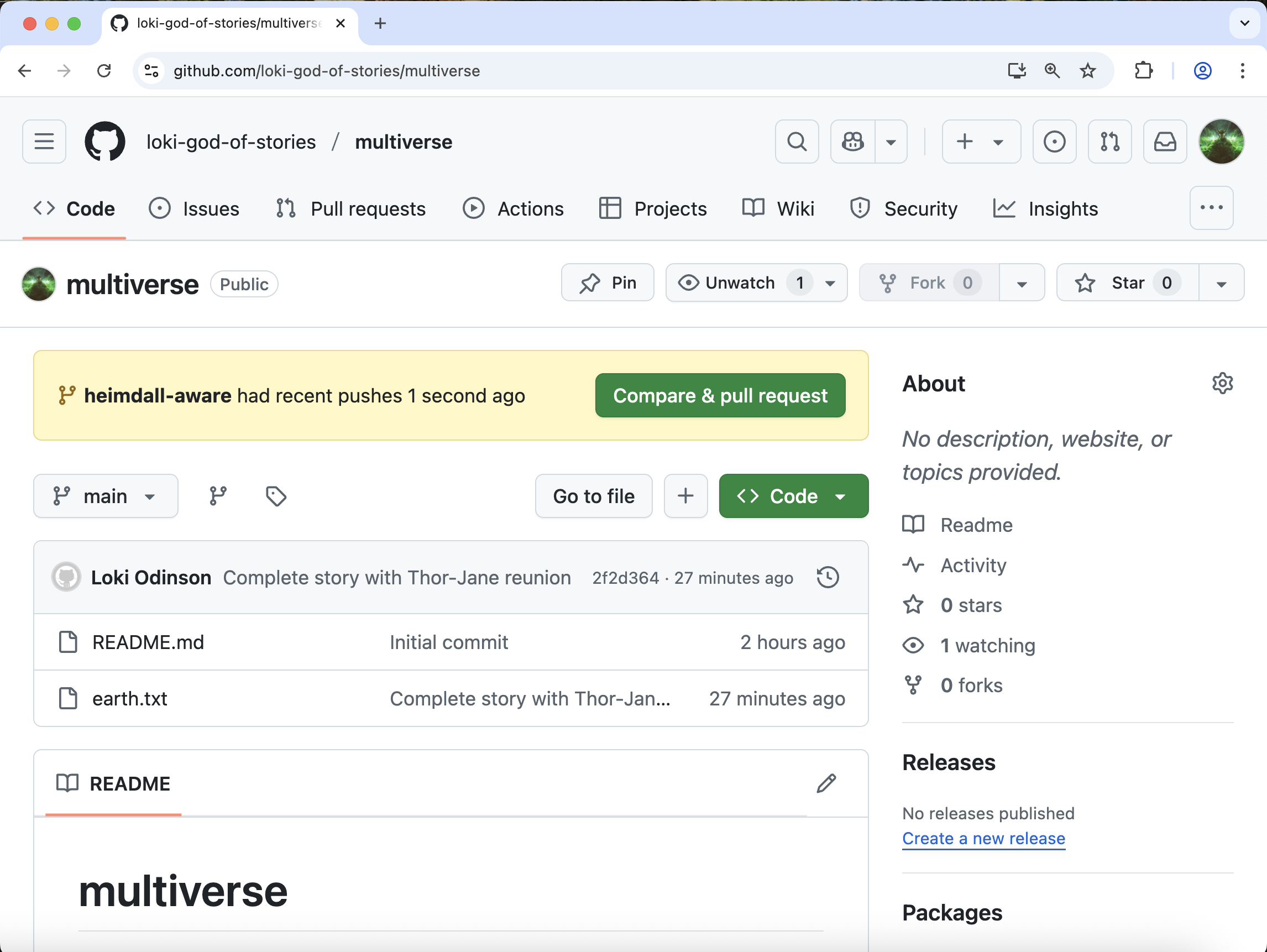
Now, we can go back to GitHub and verify that we have a new branch named heimdall-aware.
Key Points
- Branches can be useful for developing while keeping the main line static